Spreadsheets vs. QC Software: When Does Manual Quality Control Stop Scaling?
- Quality Control App
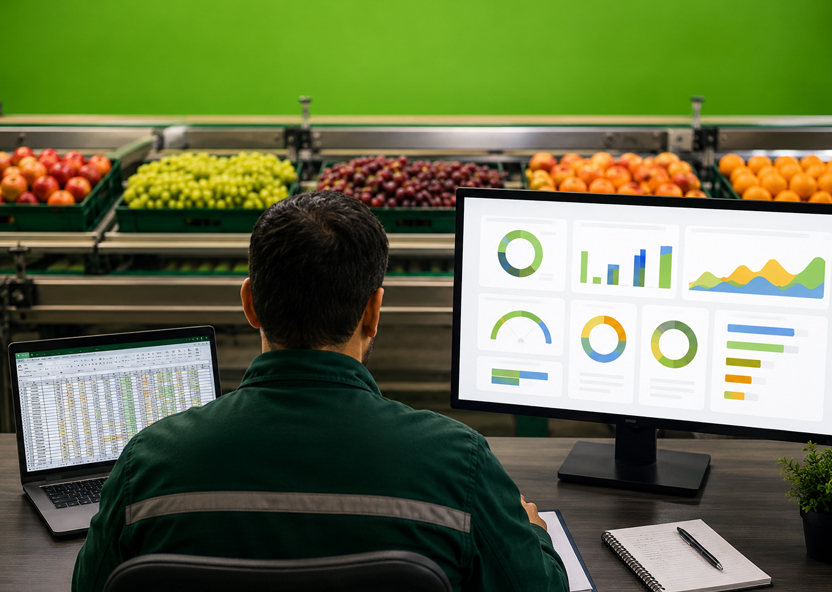
Every fresh produce QC operation starts with the tools already on hand: paper forms, Excel files, shared drives, and inboxes. That is where most operations start, and it’s a rational starting point.
But it becomes uncomfortable as soon as the organization begins to scale.
For quality control software vs spreadsheets, the practical answer is simple: spreadsheets work when inspection volume is low, the team is small, and quality decisions are easy to verify. They break down when teams need real-time visibility, consistent scoring, photo evidence, version control, supplier reporting, or multi-site consistency.
TL;DR
- Spreadsheets are fine for low-volume, single-site QC.
- Manual quality control becomes risky when inspection data is re-typed, delayed, or scattered across files.
- Excel quality control limitations show up fastest when buyers, suppliers, products, or sites multiply.
- QC software for fresh produce creates structured inspection data, audit trails, and real-time visibility.
- The switch becomes urgent when quality disputes are settled by opinion instead of evidence.
Can you run fresh produce quality control on spreadsheets?
The (very) short answer is yes, and because agriculture lags behind other industries in technology adoption, they’re still embedded in even more advanced operations. You can run fresh produce quality control on spreadsheets when the operation is small, simple, and local. Excel can work when one team inspects a limited number of products, serves a small set of buyers, and uses a stable spec that rarely changes.
The setup that works is usually narrow:
- One site or packhouse
- A small inspection team
- Low daily inspection volume
- Few products or varieties
- Few buyer-specific specs
- Limited need for photo evidence
- No urgent requirement for live reporting
- A manager who reviews files consistently
In that environment, spreadsheets can provide enough structure. Inspectors can record defects, counts, grades, and comments. Managers can review results at the end of the day. Buyers may not need detailed supporting data unless there is a dispute.
Excel is, of course, an excellent tool. The workflow around it, however, is no longer something that can sustain a growing fresh produce quality operation.
Once inspection results are copied from paper, emailed between teams, renamed across versions, or merged manually for reporting, the QC process becomes harder to trust. The business may still have inspection data, but it no longer has a dependable quality system.
Where do spreadsheets break down for produce QC?
Spreadsheets break down when fresh produce quality control depends on speed, evidence, consistency, and shared data. Excel can record an inspection, but it does not control how inspectors score defects, which version of the spec they use, or how quickly results reach the people making commercial decisions.
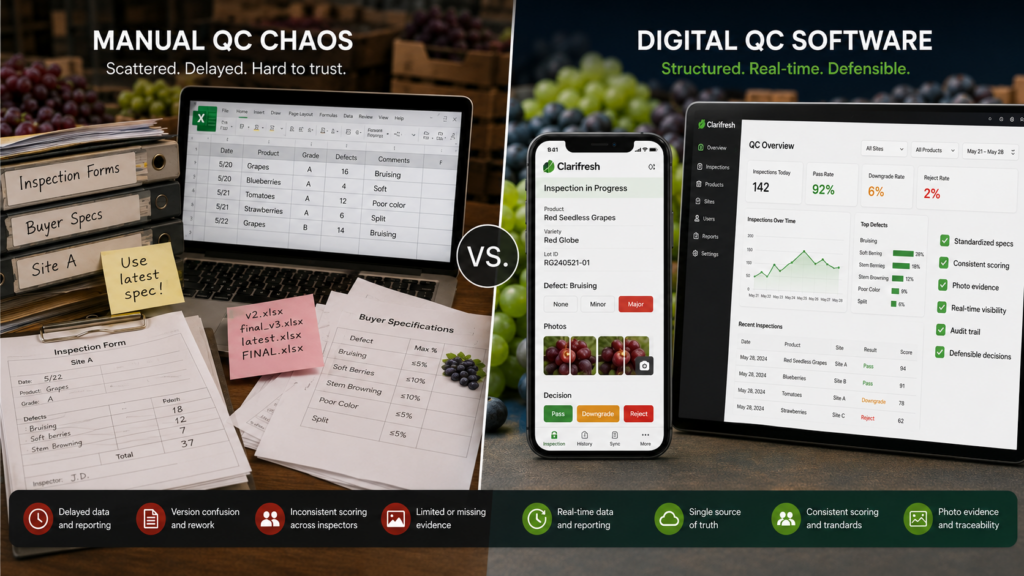
- The first failure point is re-typed data. Inspectors record notes on paper, WhatsApp, or a printed checklist, then someone enters the results into a spreadsheet later. Every handoff creates room for missing values, transcription errors, and delayed reporting.
- Incomplete evidence is the next failure point. A cell that says “bruising” or “poor color” is hard to defend in a dispute. Without time-stamped photos, sample details, and inspection context, teams end up arguing over interpretation rather than reviewing evidence.
- Then comes version chaos. One buyer spec lives in a PDF. Another sits in an email thread. The inspection sheet is called “final_v7.xlsx.” A site manager has a newer version saved locally. The file still exists, but version control has already failed.
Standardization is key to efficient scaling, but manual processes make it impossible
Spreadsheets also make standardization difficult. One inspector may score a defect as minor. Another may treat the same defect as major. Without structured specs, severity classes, required fields, and validation, manual quality control depends too much on individual judgment.
The last failure is visibility. By the time files are emailed, merged, cleaned, and summarized, the truck may have left, the product may have softened, and the buyer conversation may already have started. Inspection data exists, but it is too late to guide the decision.
And we haven’t even touched on the infamous accuracy problem that spreadsheets pose for effective business decision-making.
| Dimension | Spreadsheets / manual | QC software |
| Upfront cost | Near zero | Subscription |
| Familiarity | Already known by most teams | Requires setup and training |
| Data capture | Re-typed after inspection; error-prone | Captured at inspection point, including photos |
| Standardization | Depends on each inspector | Shared digital specs and consistent scoring |
| Visibility | After files are emailed or merged | Real-time visibility across sites |
| Multi-site consistency | Diverges by location | One spec library across sites |
| Evidence in disputes | Subjective notes and scattered files | Time-stamped data, images, and audit trail |
| Reporting | Manual and per-request | Auto-generated reports and multi-grade comparisons |
| Inspector onboarding | Shadowing an expert | Guided workflows and remote training |
What does QC software actually change?
QC software changes fresh produce quality control by turning inspections into structured, standardized data at the point of capture. Instead of recording results in paper forms or flexible spreadsheets, inspectors score against defined specs, required fields, tolerances, and evidence rules.
The biggest change is structure
A digital inspection does not ask an inspector to remember the buyer spec or interpret a blank cell. It guides the inspector through the right product, grade, attribute, defect class, and sampling method. That creates standardized inspections across people, sites, and shifts.
Grade consistency throughout the supply chain
Modern QC software for fresh produce can also reduce grader-to-grader drift. Computer-vision scoring, where available, helps assess visual attributes such as color, size, and defects against the same criteria every time. This does not remove human expertise. It gives inspectors a more consistent reference point.
The inspection workflow speeds up
Results sync from the field, packhouse, warehouse, or receiving dock into a dashboard. QC leaders can see inspection outcomes while decisions are still open, not days later. That improves routing, acceptance, rejection, downgrade, and renegotiation decisions.
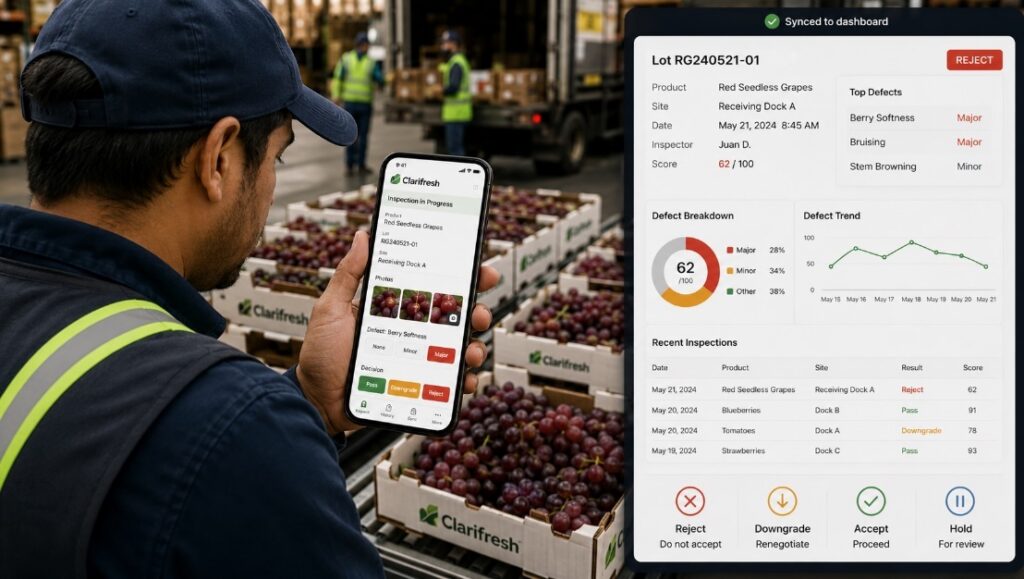
Reporting becomes easier and more objective
Digital quality inspections make it easier to compare grades, suppliers, varieties, origins, buyers, and sites over time. Instead of building reports manually, teams can use inspection data for trend analysis, supplier scorecards, buyer reviews, and operational planning.
QC data can be exported to ERP, BI, or supply chain systems, so quality results are not trapped in local files. That matters when quality data affects claims, inventory, procurement, dispatch, and commercial decisions.
Human augmentation that compounds over time
Finally, QC software changes training. Guided workflows and remote onboarding help new or seasonal inspectors produce usable data faster. The goal is not to make inspectors less important. It is to make their judgment easier to apply consistently.
What are the signs you’ve outgrown manual QC?
You have outgrown manual quality control when the process can still record inspections, but can no longer support fast, consistent, evidence-based decisions. The clearest signs are not only operational. They show up in disputes, delays, reporting gaps, and quality decisions that depend too much on individual judgment.
Use this checklist:
- Quality disputes are settled by opinion, not evidence. If teams cannot produce time-stamped photos, sample details, spec version, and inspection history, every dispute becomes harder to resolve.
- Inspection data arrives too late to change the decision. If results are reviewed after the truck has left, the data may be useful for records, but not for routing, downgrade, rejection, or renegotiation decisions.
- You have added a second site, region, or retailer program. Manual quality control often works in one location. It breaks faster when each site starts adapting specs, scoring, and reporting in its own way.
- Inspectors are using different versions of the same spec. When requirements live in PDFs, emails, spreadsheets, and local folders, version control becomes a quality risk.
- Receiving inspections are creating a backlog. If QC slows product movement at the dock, the process is no longer just administrative. It is affecting freshness, fulfillment, and customer service.
- Buyers ask for data you cannot produce quickly. Supplier performance, defect trends, inspection history, photo evidence, and grade comparisons should not require a manual reporting project.
- Renegotiations or rejections are trending up. A rise in claims and repacks may reflect product quality, but it may also point to inconsistent scoring, unclear specs, or weak evidence capture.
- QC knowledge lives in one person’s head. If new or seasonal inspectors need to shadow one expert to understand how quality decisions are made, the process is not standardized enough to scale.
How disruptive is switching from spreadsheets to QC software?
Switching from spreadsheets to QC software is usually less disruptive than teams expect. Modern platforms are built around mobile inspections, self-service configuration, and cloud access, so implementation is measured in weeks, not quarters.
The usual rollout is straightforward:
- Set up the core spec library: Existing Excel files, PDFs, and buyer requirements become the starting point.
- Configure inspection workflows: Teams define products, attributes, tolerances, required fields, photos, and sampling rules.
- Train inspectors: Mobile-first workflows reduce the learning curve, especially for seasonal or remote teams.
- Pilot with one category or site: QC leaders validate the process before expanding.
- Connect reporting: Dashboards, exports, ERP integration, and supplier scorecards can follow once inspection data is clean.
The real switching cost is process clarity. If a company already knows what it inspects, which specs matter, and where manual QC is failing, implementation is faster.
The ROI case depends on volume, rejection costs, labor structure, and dispute frequency. In our experience implementing automated QC across a wide range of global fresh produce operations, reducing rejections and inspection time can create payback within a season for high-volume teams. The broader point is simple: once inspection data becomes structured and usable, QC stops being a recordkeeping function and starts supporting commercial decisions.
The spreadsheet is not the problem. The ceiling is.
Spreadsheets are a sensible place to start. They become a constraint when fresh produce quality control needs evidence, speed, consistency, and data that teams can actually use. Clarifresh helps QC teams move from scattered files to structured digital inspections built for real produce operations.
See what a 15-minute digital inspection looks like.
FAQ
Is Excel good enough for fresh produce quality control?
Excel can work for very small teams inspecting low volumes at one site. It usually stops being enough when you manage multiple inspectors, products, suppliers, buyers, or locations. At that point, Excel quality control limitations become clear: data silos, weak version control, slow reporting, limited audit trails, and poor real-time visibility.
What is the difference between digital QC and using spreadsheets on a tablet?
A spreadsheet on a tablet is still a manual quality control process. It is just more portable. Digital QC uses structured specs, required fields, validation rules, guided workflows, photo evidence, automatic sync, and audit trails. The difference is not the device. It is whether inspection data becomes standardized, searchable, and usable across the business.
How long does it take to implement fresh produce QC software?
Fresh produce quality control software is usually implemented in weeks, not quarters, when it is mobile-first, cloud-based, and does not require dedicated hardware. A typical rollout moves through setup, self-service configuration, remote or on-site training, pilot inspections, and go-live. ERP integration, supplier scorecards, and multi-site deployment may add complexity.
Do inspectors need technical training to use QC software?
Inspectors do not need technical training to use modern QC software for fresh produce. Guided workflows show what to inspect, which spec to apply, which fields are required, and how to record defects. This helps new, seasonal, or remote inspectors produce standardized inspections instead of relying on memory, paper-based inspections, or local habits.
Can QC software work offline in the field or packhouse?
Yes. Many digital quality inspections can be completed offline in fields, packhouses, warehouses, or receiving areas where connectivity is unreliable. Inspectors capture results, photos, and defect data on a mobile device, then sync inspection data when the connection returns. This supports inspector productivity without sacrificing version control or auditability.